Why Does My Portable Power Station Lose Charge When Turned Off?
If your portable power station loses charge while turned off, it does not automatically mean the battery is failing.
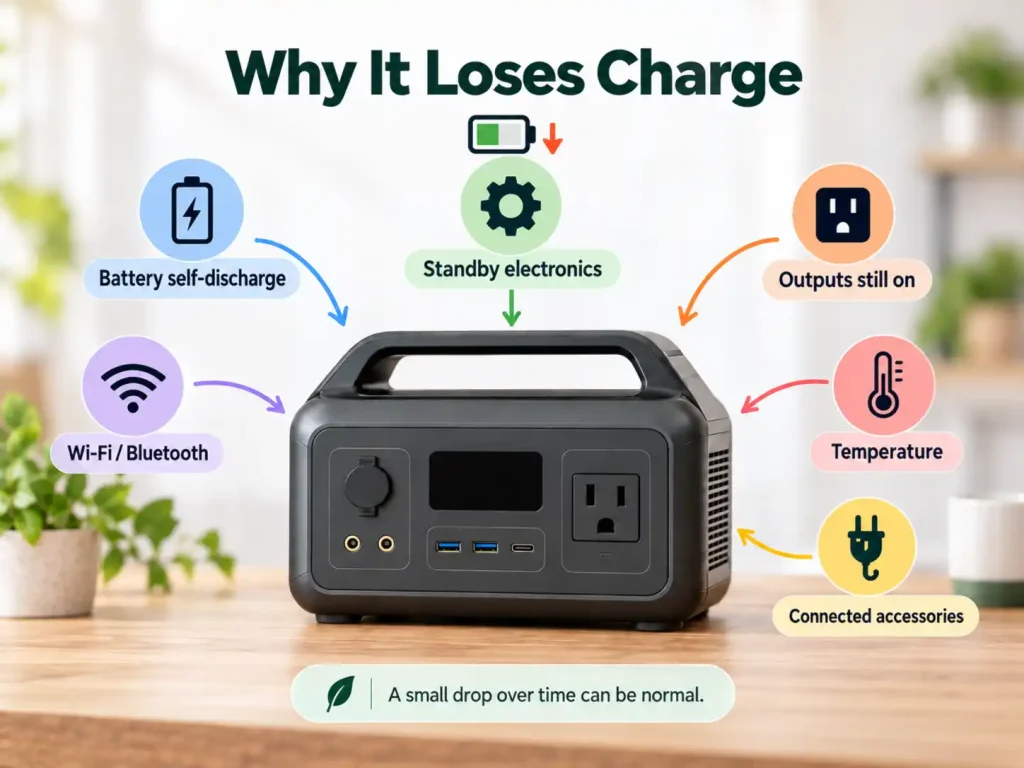
Rechargeable lithium-ion batteries naturally lose a small amount of stored energy over time. This is called self-discharge. A portable power station may also use a little power for its battery protection system, display, wireless connection, or other electronics, depending on how the unit is designed.
Other possible causes include an AC or DC output left on, Wi-Fi or Bluetooth, connected cables or expansion batteries, storage temperature, battery age, software settings, or the battery meter recalculating how much charge is left.
The key question is how fast the charge is dropping. A small change over weeks or months may be normal. A large drop that keeps happening over a short period, even when the unit is fully shut down and disconnected, is worth checking.
If you are trying to understand how battery capacity translates into usable backup time, see the Eco Grid Explorer portable power station size and watt-hour guide.
Quick Check: Normal Storage Loss or a Problem?
| What You Notice | What to Do |
|---|---|
| Small decrease over weeks or months | This may be normal battery self-discharge or a small amount of power used while the station is idle. Compare it with your manufacturer’s storage guidance. |
| Battery percentage changes after restarting | The battery meter may have recalculated how much charge is left. Repeat the test before assuming that much energy was actually lost. |
| Charge drops when AC, DC, USB, Wi-Fi, or Bluetooth is left on | Turn off unused features and check your model’s ECO, timeout, or sleep settings. |
| Charge drops only with cables, accessories, or expansion batteries attached | Disconnect them when the manufacturer says it is safe to do so, then test the main unit by itself. |
| A large drop keeps happening over a short period while fully shut down | Check the manual, settings, software updates, and manufacturer support. |
| Unit becomes unusually hot, swells, smells abnormal, smokes, or shows a battery warning | Stop using and charging it and follow the manufacturer’s safety instructions. |
There is no single rule such as “1% per day” or “1% per month” that applies to every portable power station. Battery type, size, age, temperature, software, and the way the station shuts down can all affect what you see.
Why Does My Portable Power Station Lose Charge When Turned Off?
A portable power station is more than a battery. Inside it are battery cells plus electronics that manage charging, protect the battery, create AC power, run the display, and control other features.
Pressing the power button may turn off most of those systems without completely disconnecting every electronic part from the battery.
1. The Battery Naturally Loses Some Charge
Rechargeable batteries slowly lose stored energy even when nothing is plugged in. This is called self-discharge.
The U.S. Department of Energy’s Alternative Fuels Data Center describes lithium-ion batteries as having low self-discharge. Low does not mean zero.
How fast this happens depends on the battery type, condition, temperature, charge level, and how long it is stored. That is one reason a power station left unused for months may not show exactly the same percentage when you turn it back on.
2. Battery Protection Electronics May Still Use a Little Power
Portable power stations use a battery management system, often called a BMS. Its job is to monitor and protect the battery.
Depending on the model, some low-power electronics may remain active even when the station appears to be off. These can include battery monitoring, temperature sensors, clocks, control circuits, Wi-Fi, or Bluetooth.
This does not mean every power station keeps all of these features running while off. The design varies by model.
3. The Station May Not Be Fully Shut Down
Many power stations have separate controls for different parts of the unit. You may have individual controls for AC outlets, 12V DC outlets, USB ports, wireless charging, Wi-Fi, Bluetooth, the screen, or ECO mode.
A dark screen does not always mean everything is off.
Use the shutdown instructions in your owner’s manual. If your station has an app, check whether any outputs or wireless features are still active.
4. Leaving the AC Inverter On Can Use Power
The inverter is the part of the power station that creates household-style AC power for the outlets. It needs some energy just to stay running, even when no appliance is using much power.
Other active output circuits can also use some energy.
Manufacturer documentation for some Anker SOLIX models, for example, separates the main power control from AC, car-socket, wireless, and other output controls. Some models also include automatic shutdown or power-saving settings.
The important point is simple: a station can look idle while one of its power outputs is still turned on.
5. Connected Cables or Accessories Can Affect the Test
If you are trying to find the cause of unexplained battery drain, disconnect everything the manufacturer allows you to remove, including:
- USB cables
- AC appliances
- 12V accessories
- solar cables
- car-charging cables
- adapters and hubs
- expansion batteries
Even equipment that appears to be off can make troubleshooting harder. Testing the power station by itself gives you a clearer result.
6. Wi-Fi or Bluetooth May Use Some Power
Some newer power stations stay connected to an app or wireless network in certain modes.
If your unit has an app, look for settings such as:
- device timeout
- AC timeout
- DC timeout
- ECO mode
- energy-saving mode
- Bluetooth
- Wi-Fi
- screen timeout
- sleep or standby mode
The names of these settings vary by brand. Check your own manual rather than assuming all power stations work the same way.
7. Storage Temperature Matters
Manufacturers give storage temperature limits because heat and cold affect lithium-ion batteries.
A hot car, attic, shed, or garage can expose the battery to temperatures outside its recommended range. Heat can also speed up long-term battery aging.
Use the storage temperature instructions for your exact model.
8. The Battery Percentage on the Screen Is an Estimate
The number on the display is not a direct measurement of exactly how many watt-hours remain. The station’s battery system estimates the percentage using battery data and software.
That estimate can change after the battery sits for a while, charges, discharges, or restarts.
For example, suppose the station shows 70% before you shut it down and 64% when you turn it back on a few days later. That does not automatically prove that exactly 6% of the battery’s rated energy disappeared while it was stored.
The battery meter may simply have updated its estimate.
That is why repeating the same test is more useful than relying on one reading.
9. An Older Battery May Hold Less Energy
Rechargeable batteries slowly lose usable capacity as they age and go through charge and discharge cycles.
Battery aging is more likely to be part of the problem if you also notice:
- shorter runtime with the same appliance
- unexpected shutdowns
- large jumps in the battery percentage
- charging problems
- battery warnings
If you want to compare battery capacity with appliance runtime, see how to calculate portable power station runtime.
10. Software or Settings Can Change How the Station Behaves
Modern power stations use built-in software, often called firmware, to control charging, the display, wireless features, output timers, battery limits, and power-saving modes.
If the battery started draining faster after you changed a setting or installed a software update, check the manufacturer’s current support information and app.
Do not install unofficial firmware or try to bypass the station’s battery safety systems.
Why Is My Portable Power Station Draining Overnight?
A large overnight drop deserves more attention than a slow change over several weeks.
First check whether any of these were still on or connected:
- AC outlets
- DC output
- USB output
- wireless charging
- Wi-Fi
- Bluetooth
- an accessory
- an expansion battery
Also make sure the station actually completed its full shutdown procedure.
If everything was off and disconnected, try the 72-hour test below. If the same large drop keeps happening, compare your result with the manufacturer’s guidance and contact support.
🎬 Watch: Portable Power Station Standby Drain Tested
Want to see how standby power use differs between portable power stations? Project Farm tests multiple models and compares standby drain along with battery capacity, charging, and efficiency.
How to Test a Power Station for Excessive Battery Drain
You do not need to open the station or make any electrical changes to test for battery drain.
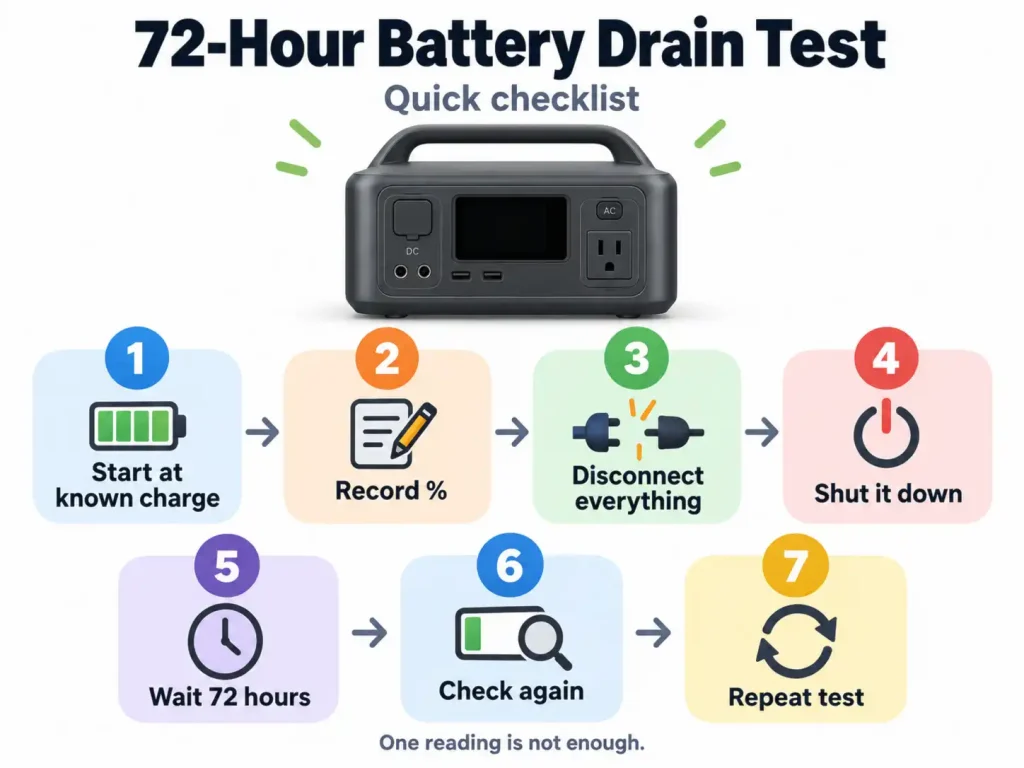
Step 1: Start With a Known Charge Level
Charge the unit to an easy-to-record level, such as 70% or 80%.
For long-term storage, however, follow the charge-level recommendation in your owner’s manual.
Step 2: Write Down the Starting Conditions
- starting battery percentage
- date and time
- approximate storage temperature
- firmware version, if shown
- whether Wi-Fi or Bluetooth is on
- whether AC and DC outputs are off
Step 3: Disconnect Everything
Remove appliances, charging cables, USB cables, solar input, DC accessories, and other equipment.
If your system has an expansion battery, check the manual before disconnecting it.
Step 4: Fully Shut Down the Station
Follow the shutdown steps in the owner’s manual. Do not assume that pressing the power button once turns off every part of the station.
Step 5: Leave It Alone for 72 Hours
As a simple troubleshooting test, leave the station shut down and disconnected for about 72 hours in a stable location within its approved storage temperature range.
The 72-hour period is only a useful test window. It is not an industry rule for how much battery loss is acceptable.
Step 6: Check the Battery Again
Turn the station on and record the new percentage.
If the number changed, remember that the battery meter may also have recalculated its estimate.
Step 7: Repeat the Test
If the result is very different the second time, the battery meter may be part of what you are seeing.
If a large drop keeps happening under the same conditions, there is stronger reason to suspect real standby drain, a setting, or another battery-related problem.
Portable Power Station Standby-Drain Checklist
| Check | What to Look For |
|---|---|
| AC inverter | Make sure the AC outlets are off when you do not need them. |
| DC output | Make sure the 12V/DC outputs are off if your model controls them separately. |
| USB output | Remove USB cables and check whether the USB section is still active. |
| Wireless charging | Turn it off if your model has a separate control. |
| Wi-Fi | Check whether the station stays connected to Wi-Fi while idle. |
| Bluetooth | Check whether your model lets you turn Bluetooth off. |
| ECO mode | Check automatic shutoff and low-load settings. |
| Expansion battery | Read the manufacturer’s instructions for storing or disconnecting extra batteries. |
| Cables and adapters | Remove them during your test. |
| Firmware | Check the manufacturer’s support page for recommended updates or known issues. |
What About ECO Mode, Sleep Mode, and Auto-Off Settings?
These settings can help reduce unnecessary power use, but they do not work the same way on every brand.
For example, one ECO mode may turn off the AC outlets when the connected load becomes very small. Another brand may use a different type of sleep setting.
Check your manual or app for:
- automatic AC shutoff
- automatic DC shutoff
- low-load timeout
- screen timeout
- sleep mode
- Wi-Fi or Bluetooth settings
- scheduled charging or discharging
If you keep the station for emergency backup, turning off features you do not need can reduce the chance of finding a partly drained battery during an outage.
Do Expansion Batteries Cause Drain?
An expansion battery adds another battery and more electronics to the system.
Depending on the design, the main power station and the expansion battery may communicate with each other and work as one larger battery system.
Do not disconnect an expansion battery unless the manufacturer says it is safe to do so. Some systems have specific shutdown and connection steps.
If your manufacturer allows the main station to work without the expansion battery, testing the main unit by itself can help you narrow down the cause of the drain.
How Much Battery Loss While Turned Off Is Normal?
There is no reliable universal answer such as “1% per month is normal” for every portable power station.
The battery cells themselves can slowly lose charge, but the station’s electronics and software may also use some power. Different manufacturers handle sleep and shutdown differently.
The best way to judge your station is to compare:
- the storage guidance for your exact model
- your own repeated tests under similar conditions
- manufacturer support advice if the drain looks excessive
A small change over several months is very different from a large drop overnight.
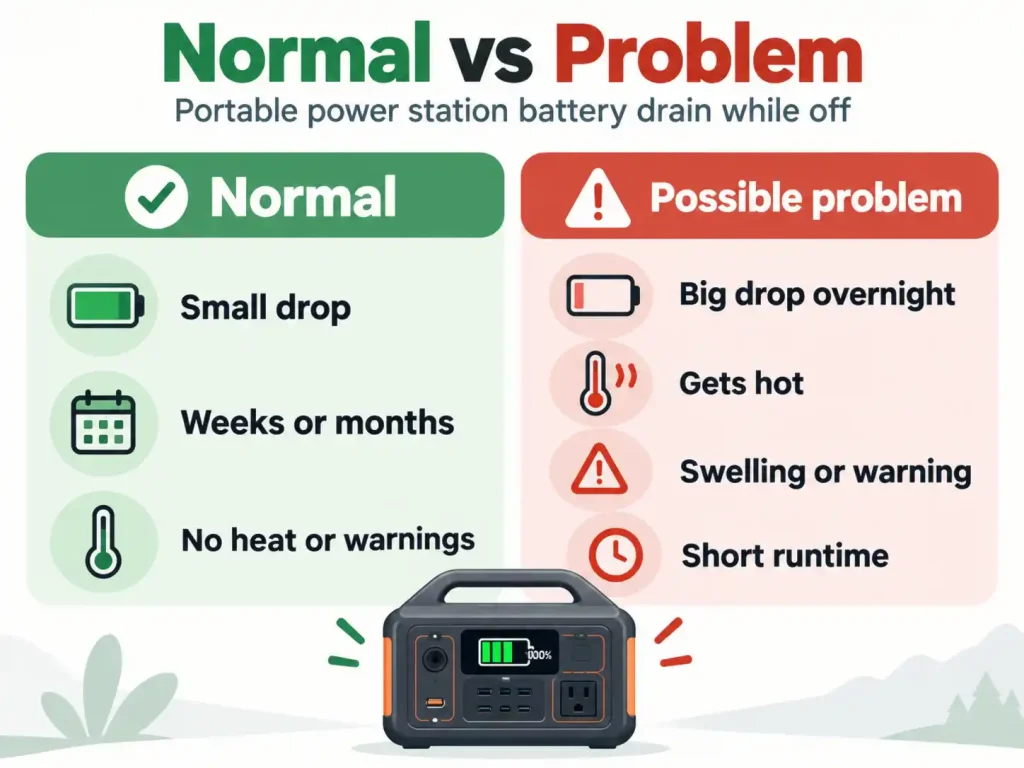
When Battery Drain May Indicate a Problem
Contact the manufacturer if your power station repeatedly:
- loses a large amount of charge over a short period while fully shut down and disconnected
- turns itself on unexpectedly
- shows battery or temperature errors
- shuts down even though the screen still shows plenty of charge
- runs for much less time than expected with a known appliance
Stop Using It for Abnormal Heat, Swelling, Smoke, or Odor
Unusual heat, swelling, smoke, fire, or other obvious signs of battery damage are not normal standby drain.
The U.S. Consumer Product Safety Commission has documented lithium-ion products in which battery overheating and swelling were linked to fire hazards.
If your power station becomes unusually hot, swells, smokes, smells unusual, shows physical damage, or gives a serious battery warning, stop using and charging it and follow the manufacturer’s safety and service instructions.
Do not open the battery enclosure.
What Not to Do
- Do not open the battery pack.
- Do not bypass the BMS or other safety protections.
- Do not try to charge the internal battery cells directly.
- Do not disable temperature protection.
- Do not modify the internal battery wiring.
- Do not install unofficial software meant to bypass safety systems.
A power station can still contain a large amount of stored electrical energy even when its screen is off.
How to Reduce Battery Loss During Storage
- Use the manufacturer’s full shutdown procedure.
- Turn off outputs you are not using.
- Disconnect unnecessary accessories.
- Store the station in a dry place within its approved temperature range.
- Follow the manufacturer’s recommended storage charge level.
- Follow its recommended inspection or recharge schedule.
- Install manufacturer-recommended firmware updates when appropriate.
Do not copy another brand’s storage routine. Storage instructions can differ from one model to another, so your own manual should take priority.
Why This Matters for Power Outage Readiness
If your portable power station is part of your emergency supplies, storage drain matters.
A station that has been sitting unused for several months may have less available energy than it did when you put it away.
Make battery checks part of your outage-preparedness routine:
- check the battery percentage from time to time
- look over the station and cables for damage
- make sure it still charges normally
- check for important software updates or safety notices
- make sure it can still power the appliances you consider essential
For appliance planning, see the Eco Grid Explorer guide to what a portable power station can run.
What Information Should I Give Manufacturer Support?
If your test suggests that the station is losing charge too quickly, gather a few details before contacting support:
- exact model name and number
- serial number
- firmware version
- starting battery percentage
- ending battery percentage
- how long the station was stored
- approximate storage temperature
- whether AC and DC outputs were off
- whether Wi-Fi or Bluetooth was on
- whether anything was connected
- whether an expansion battery was attached
- photos or screenshots of any warnings
This gives the support team much more useful information than simply saying the battery “dies while off.”
Does LiFePO4 Stop Self-Discharge?
No.
LiFePO4, also called LFP, is a type of lithium-ion battery commonly used in newer portable power stations.
An LFP battery can still slowly lose charge during storage. The rest of the power station may also use a small amount of energy for monitoring and control electronics.
So an LFP power station should not be expected to keep exactly the same battery percentage forever while stored.
Frequently Asked Questions
Why did my portable power station lose 10% while it was off?
How long it took to lose that 10% matters. A 10% change over a long storage period is very different from a 10% drop overnight. Possible causes include normal self-discharge, an output left on, wireless features, connected equipment, temperature, battery age, or the battery meter recalculating its estimate. If the drop happened quickly, use the shutdown test above.
Why does my power station lose charge overnight?
First make sure the AC outlets, DC outputs, USB circuits, Wi-Fi, Bluetooth, wireless charging, and connected accessories are actually off or disconnected. If the station still shows a large drop overnight after a proper shutdown, check the manufacturer’s support guidance.
Can leaving the AC inverter on drain the battery?
Yes. The inverter uses some energy just to stay on, even if little or nothing is plugged into the AC outlets. How much it uses depends on the model.
Can Bluetooth or Wi-Fi drain a portable power station?
They can use some energy on models where those systems stay active. Check your specific station because different brands handle wireless standby differently.
Can leaving a USB cable plugged in drain the battery?
It can complicate standby behavior, especially if the USB output remains active. For troubleshooting, disconnect all cables and accessories.
Should I store my portable power station at 100%?
Not automatically. Long-term storage instructions vary by manufacturer and model. Follow the storage charge level and maintenance schedule in your owner’s manual.
Should I leave my power station plugged into the wall?
Only if the manufacturer supports that type of use. Some stations are designed for extended backup operation, while long-term storage instructions may be different. Check your manual.
Does turning off AC output completely shut down the station?
Not necessarily. The AC outlets are only one part of the station. DC, USB, wireless, display, networking, and battery-protection systems may have separate controls or standby behavior.
How often should I check a stored power station?
Follow the manufacturer’s maintenance schedule. If the station is part of your emergency plan, check its charge and condition regularly enough that you do not first discover a problem during an outage.
My Take
A portable power station losing a little charge while stored is not automatically a sign of a bad battery.
The battery itself can slowly lose energy, and some stations also use a small amount of power for monitoring, wireless features, or other electronics.
The important difference is between slow storage loss and a large drop that keeps happening.
If your battery percentage falls much faster than you expect, fully shut down the station using the manual, disconnect everything, write down the starting percentage, and repeat the 72-hour test.
If the same problem keeps happening, contact the manufacturer with your model, firmware version, starting and ending charge, storage time, temperature, and connection details.
If the unit becomes unusually hot, swells, smokes, smells unusual, or shows obvious physical damage, stop using it rather than treating the issue as normal battery drain.
Sources
- U.S. Department of Energy Alternative Fuels Data Center – Batteries for Electric Vehicles – lithium-ion battery characteristics, including low self-discharge.
- EcoFlow RIVER 3 Series User Manual – manufacturer storage, temperature, and maintenance guidance showing why storage instructions are model-specific.
- Anker SOLIX C800 Portable Power Station User Guide – official Anker support documentation covering power controls, standby settings, battery storage, and maintenance.
- Anker – Complete Guide to Using the Anker App – official manufacturer guidance on output controls, timers, and power-saving settings.
- U.S. Consumer Product Safety Commission – Lithium-Ion Battery Safety Warning Example – an example of overheating, ignition, and swelling hazards involving defective lithium-ion battery products.
Important: Storage, charging, shutdown, software, and maintenance instructions differ between portable power stations. The manual and manufacturer support information for your exact model should take priority over general advice.